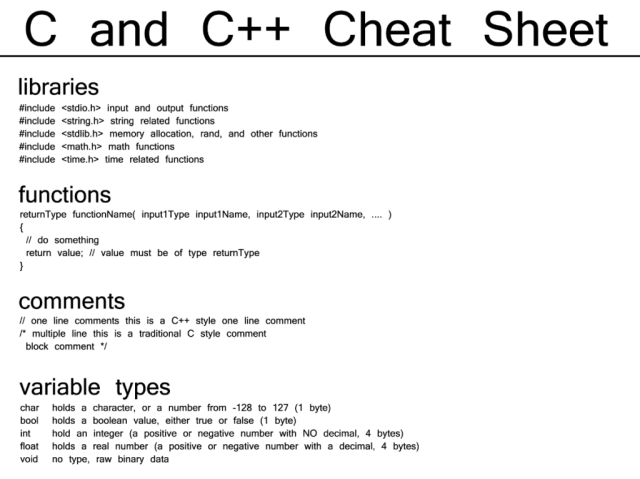
C and C++ Cheat Sheet

cheat_sheet1-1024x767.png

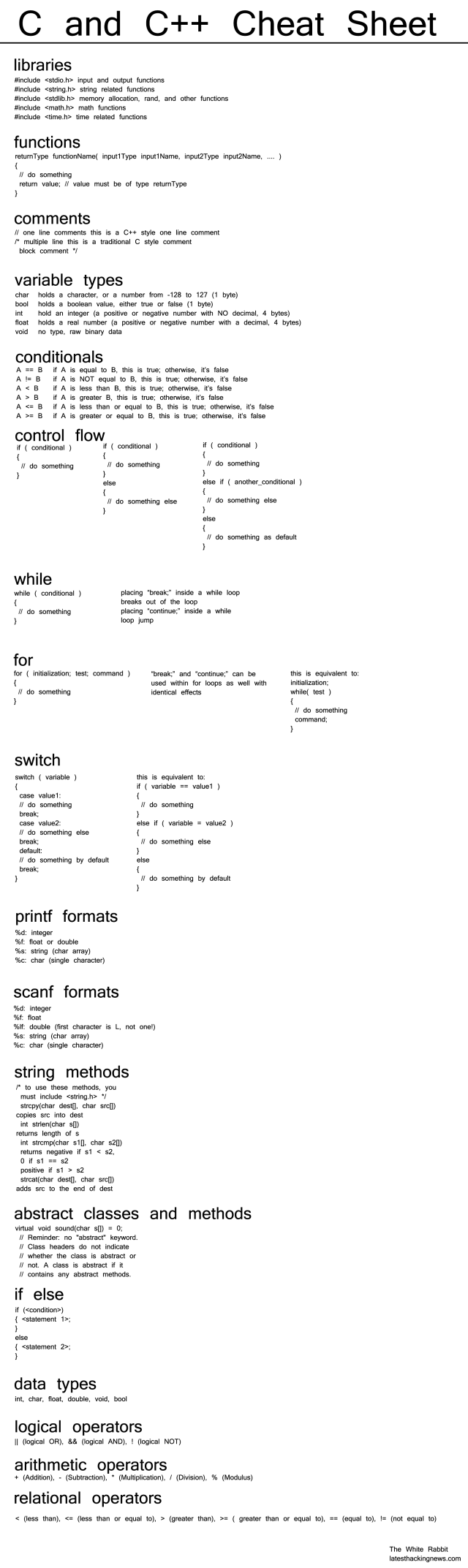
C and C++ Cheat Sheet

libraries
#include input and output functions
#include string related functions
#include memory allocation, rand, and other functions
#include math functions
#include time related functions
functions
returnType functionName( input1Type input1Name, input2Type input2Name, …. )
{
// do something
return value; // value must be of type returnType
}
comments
// one line comments this is a C++ style one line comment
/* multiple line this is a traditional C style comment
block comment */
variable types
char holds a character, or a number from -128 to 127 (1 byte)
bool holds a boolean value, either true or false (1 byte)
int hold an integer (a positive or negative number with NO decimal, 4 bytes)
float holds a real number (a positive or negative number with a decimal, 4 bytes)
void no type, raw binary data
conditionals
A == B if A is equal to B, this is true; otherwise, it’s false
A != B if A is NOT equal to B, this is true; otherwise, it’s false
A < B if A is less than B, this is true; otherwise, it’s false A > B if A is greater B, this is true; otherwise, it’s false
A <= B if A is less than or equal to B, this is true; otherwise, it’s false A >= B if A is greater or equal to B, this is true; otherwise, it’s false
control flow 
if ( conditional )
{
// do something
}

if ( conditional )
{
// do something
}
else
{
// do something else
}
if ( conditional )
{
// do something
}
else if ( another_conditional )
{
// do something else
}
else
{
// do something as default
}
while ( conditional )
{
// do something
}
placing “break;” inside a while loop
breaks out of the loop

placing “continue;” inside a while
loop jumps to the start of the next
loop

for ( initialization; test; command )
{
// do something
}
“break;” and “continue;” can be
used within for loops as well with
identical effects

this is equivalent to:

initialization;
while( test )
{
// do something
command;
}

switch ( variable )
{
case value1:
// do something
break;
case value2:
// do something else
break;
default:
// do something by default
break;
}

this is equivalent to:
if ( variable == value1 )
{
// do something
}
else if ( variable = value2 )
{
// do something else
}
else
{
// do something by default
}

printf formats
%d: integer
%f: float or double
%s: string (char array)
%c: char (single character)
scanf formats
%d: integer
%f: float
%lf: double (first character is L, not one!)
%s: string (char array)
%c: char (single character)
string methods
/* to use these methods, you
must include */
strcpy(char dest[], char src[])
copies src into dest
int strlen(char s[])
returns length of s
int strcmp(char s1[], char s2[])
returns negative if s1 < s2, 0 if s1 == s2 positive if s1 > s2
strcat(char dest[], char src[])
adds src to the end of dest
abstract classes and methods
virtual void sound(char s[]) = 0;
// Reminder: no “abstract” keyword.
// Class headers do not indicate
// whether the class is abstract or
// not. A class is abstract if it
// contains any abstract methods.
Untitled-2.png

Hack Sticky Key Feature And Reset Windows Password Using CMD

reset-windows-password-cmd

Short Bytes: There are times when you forget your Windows password. You can reset Windows password using the password reset disk. But what if you don’t have one? You can use this simple method to change your Windows password using the Windows repair disk.

Protecting your Windows machine with a password is a must. It’s a great layer ofsecurity disabling unauthorized people from using your computer. But there are times when your own security layer restricts you from using your Windows OS. Probably, because you aren’t worthy of it. You fail to enter the correct password because you were absent-minded when the last time you changed your password. Or you can’t recall your password because you haven’t used your computer for months.

You can take the help of the password hint on the login screen. But what if it doesn’t help you. An effective solution to reset Windows password is to use the password reset disk. And just like me, you didn’t create the disk in the first place. Now, you’re left with an option to reinstall Windows on your computer. Well, you can do so if you don’t have any important data stored on your machine.

What if you have something important, like cat videos and dog selfie? You don’t want to loose them. So, there is a workaround by which you can reset Windows password and preserve the video of a backflipping cat. You can use Windows CMD and sticky keys to reset Windows password and gain access to your computer without formatting it.

Requirements

  • Drive letter of your Windows installation. For instance, it is C in my case.
  • Windows installation disk or Windows repair disk.
  • The most important, you shouldn’t be able to recall your Windows password.

How To Reset Windows Password Using CMD?

  1. Use the Windows repair disk to boot your computer.
  2. Choose your preferred language.
    Note: The method was tried on Windows 10. The repair disk options may differ for other Windows versions.
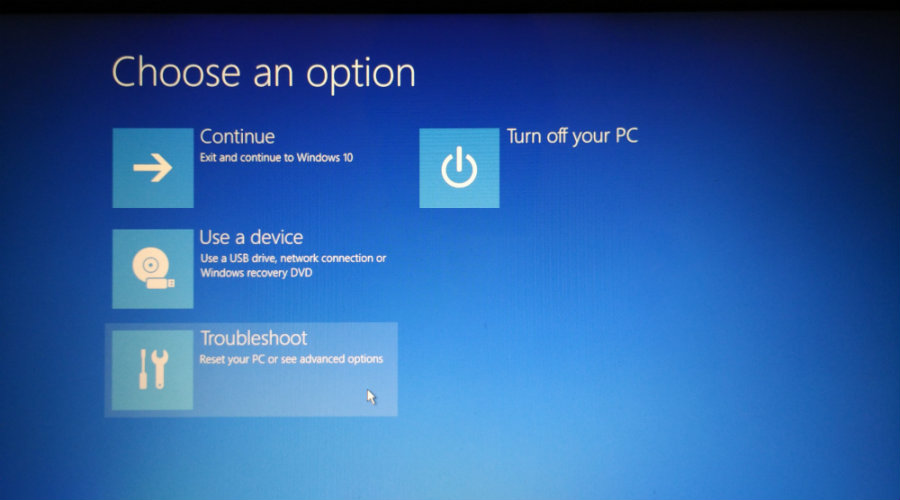
  3. Click Troubleshoot.
    reset-windows-password-1
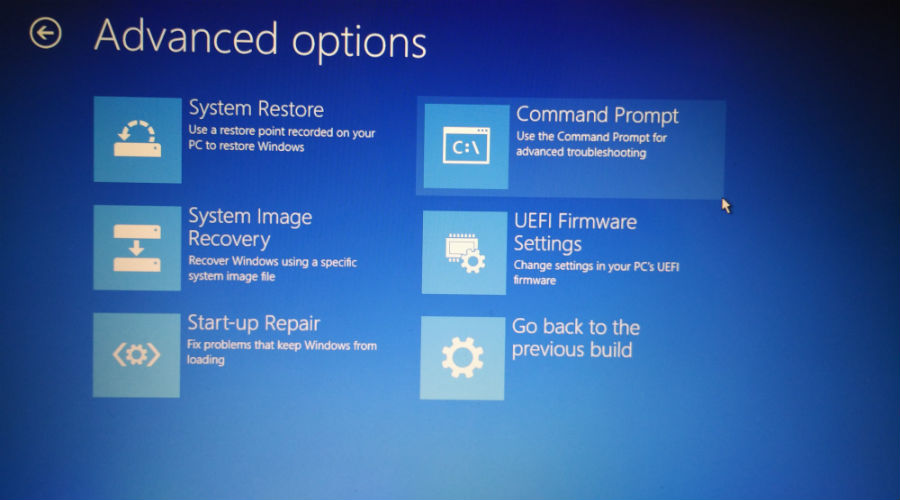
  4. Click Command Prompt.
    reset-windows-password-2
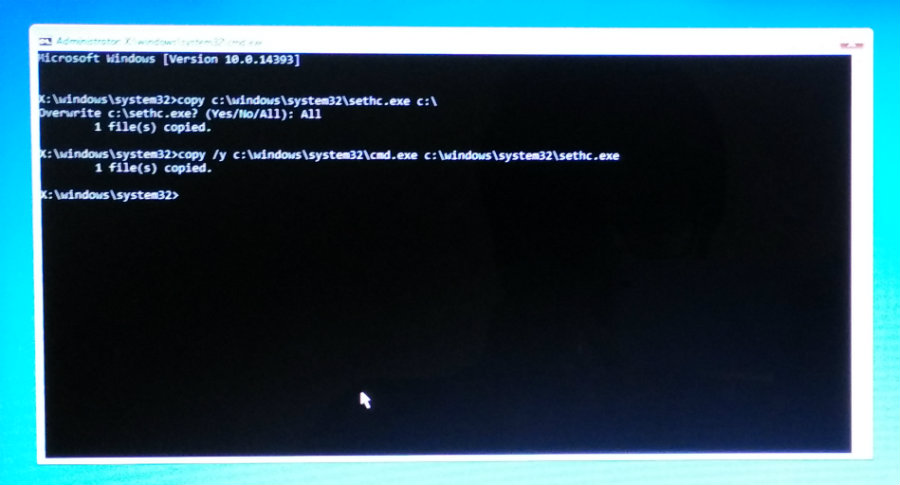
  5. In the CMD window, type the following command and press Enter:
    copy c:\windows\system32\sethc.exe c:\
  6. Now, type the following command and press Enter:
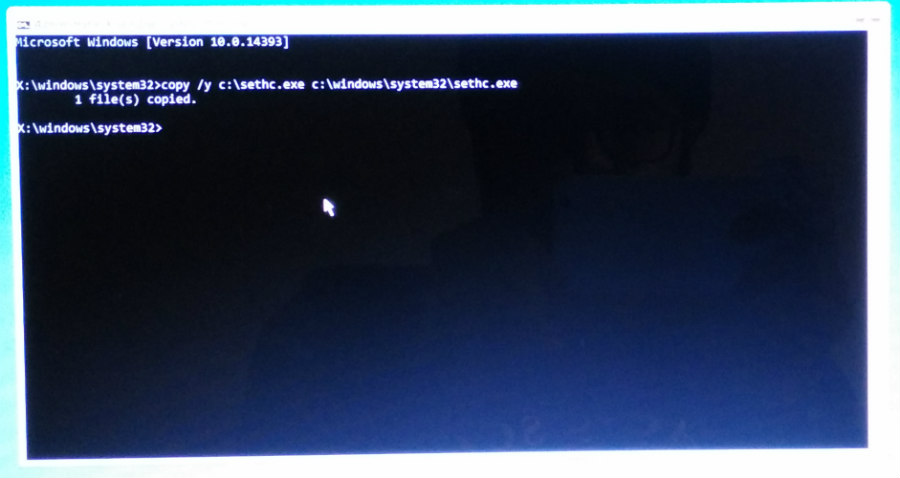
    copy /y c:\windows\system32\cmd.exe c:\windows\system32\sethc.exe

    Note: You will see the Overwrite c:\sethc.exe?  confirmation if you have done this method in the past. In this case, type All and press Enter.
    reset-windows-password-3

  7. To quit CMD, type exit and press Enter. Restart your computer.
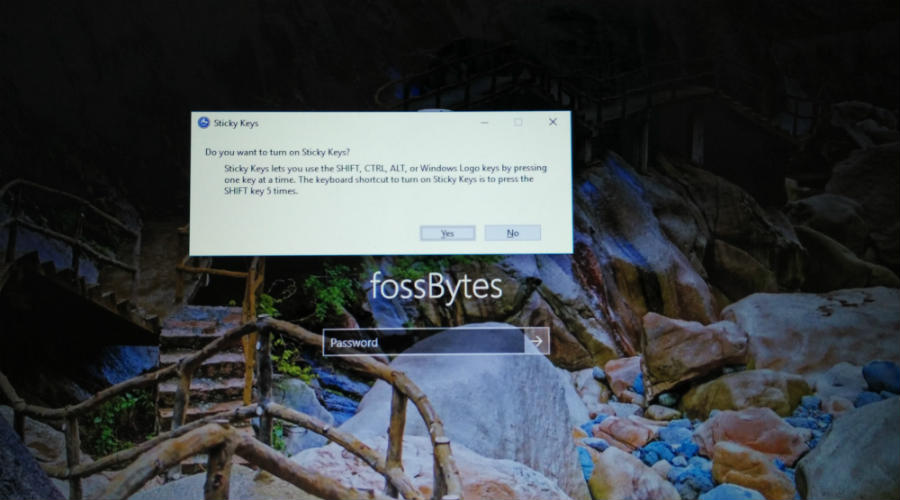
  8. At the login screen where you enter your password, press Shift key for five times. A CMD window will show up.
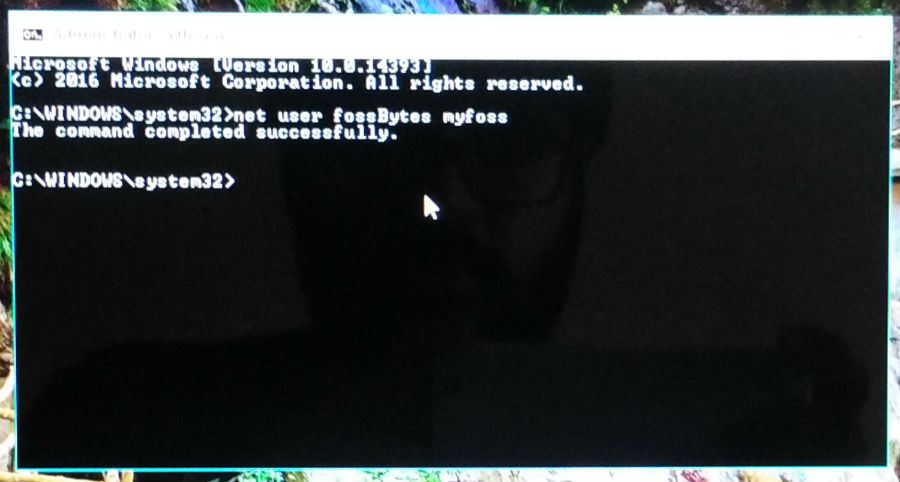
  9. Type the following command and press Enter:
    net user username password

    Important: Here, the username is your user account name and password is the new password you want to set. If your username is ironman and new password Jarvis, the command will be:
    net user ironman Jarvis

  10. Now press Enter.
    reset-windows-password-4
  11. Exit the command prompt.
  12. You can login to your Windows machine using the new password.

So, in the process, what you basically did is swapped the SETHC.exe with CMD.exe. The SETHC.exe is used to trigger the sticky key accessibility feature in Windows. Replacing it with cmd.exe starts the command prompt which can be used to change the administrator password.

Important: In our case, the method only worked for local account. We were not able to reset Windows password for the Microsoft account we used on our machine. We tested the above method on Windows 10.

How to revert what you’ve done?

Now, you have successfully changed your password but you don’t want some other person to do the same. You can easily revert the changes you’ve made:

  1. Follow the process as described earlier till step no. 4.
  2. In the command prompt window, type the following command:
    copy /y c:\sethc.exe c:\windows\system32\sethc.exe

    reset-windows-password-5

  3. Press Enter and restart your machine.
  4. Now, at the login screen, if you press Shift key for 5 times the sticky keys option will show up instead of the command line.
    reset-windows-password-5

This way, you can reset Windows password and have a sense of relieve. If you are concerned that someone can type those commands and gain access to your machine, you disable the USB ports on your machine.

If you have something to add, tell us in the comments below.

List Of Top 7 Best Android App To Hack Wi-Fi Password In 2016

List Of Top 7 Best Android App To Hack Wi-Fi Password In 2016

In 2015 “How to Hack Wi-Fi Password on Android mobile” is one of the most searched queries on the internet. In the last Article, I have already written about “how to Hack Wi-Fi Password using android mobile.” Today we are here with top 10 Android App to hack Wi-Fi password.

Here is the list best Android app to hack Wi-Fi Password based upon users positive reviews and comments. So, I apologize if some apps doesn’t worked, because some apps are working in only specific country . Hope you understand.

Top 7 Best Android App To Hack Wi-Fi password In 2016

1. WiFi Hacker For Free

“WiFi Hacker For Free” is one of the best Android app, which can easily bypass any firewall and can hack Wi-Fi password. This is the perfect app for non-technical people. It’s automatic functionality to break any kind any kind of Wi-Fi password.

Download From Here:   WIFI hacker for free

2. WIFI Password Breaker

WIFI password breaker is one of the other best app, which allows to hack Wi-Fi password. They have taken care of UI and UX.

Download From Here:    WIFI Password Breaker

3. WiFi Hacker Professional

WIFI hacker professional is a free Android app, which allows to hack Wi-Fi Passwordeasily. With this app you can pretend that you are a professional hacker into your friends.

Download From Here:    WiFi Hacker Professional

4. WIFI and Router Password Finder

This app works very well in offline mode and gives you default password of any Wi-Firouter.

How to use this app?

  • First of all, select model and version from the list, which you want to hack.
  • Now, click on “get default password and other information.”

Download From Here:    WIFI and Router Password Finder

5. Hack WIFI

Hack WiFi is one of the most advanced Android App, which comes with modern technology function. The UI and UX are good as reliable.

Download From Here:    Hack WIFI

6. WIFI password key

WIFI Password Key will generate random key and provide WEP and WAP passwords through which can easily access any secure Wi-Fi network in 5 minutes.

Download From Here:    WIFI password key

7. Hack WIFI Prank

This is one of my favorite application and this app allows to make fool your friends and family members. This app will show you all the available Wi-Fi at your location and creates fake password to hack Wi-Fi.

Download From Here:    Hack WIFI Prank

Share your views with us and Leave a comment below if you have any related queries with this. And yeah, Don’t forget to share the post. And also, subscribe our Newsletter.


List Of CMD Commands for Windows 10, 8 and 7 In 2016

List Of CMD Commands for Windows 10, 8 and 7 In 2016

Command prompt is one the best and most powerful tools in windows, but sadly, also it’s more ignored one. Things were not always like this, but with the advent of GUI based tools were boring. The ultimately lead the command prompt into obscurity.

However, command prompt is not useless at all. In fact, it’s pretty useful sometimes. I am going to share a list of all “CMD commands”.

List Of 100+ CMD Commands

First of all, go to START > RUN > CMD.

Now, you can use these CMD Commands.

Disclaimer: use these command at own risk.

How To Uninstall Pre-Installed And Suggested App In Windows 10, Here’s The Ultimate Guide

How To Remove Or Uninstall Pre-Installed App In Windows 10, Here's The Ultimate Guide

Windows 10 comes with a lot of new features and improvements. First time Microsoft, let you install its new OS at no extra cost, also you can upgrade your PC already running a genuine copy of Windows 7, Windows 8, or Windows 8.1. However, it’s come with various restrictions, which makes Windows 10 not completely free.

It’s come with pre-installed apps like People, Maps, Xbox, Photos, Groove music, OneDrive, Skype and others. Windows 1o doesn’t provide any point-and-click way to uninstall these apps. But if you want to uninstall these apps then you are right place at the right time.

Uninstalling Promotional Apps From Windows 10

When you install Windows 10 in your PC first time, you will notice some apps preinstalled default on the Start menu. These apps like Candy crush, phone companion, Get Skype, Get Office and more. They consume space and looks annoying. Now, just follow the steps below.

Step 1: Use the “Windows + I” key and open the “Setting App” page.

Step 2: Now, go-to “App & Features.”

Step 3: On “App & Features” you will see list of all your desktop and store apps currently installed on your PC.

Step 4: Now, click on the “Get Office App” then click on the Uninstall button to finish the removal.

How To Remove Or Uninstall Pre-Installed App In Windows 10, Here's The Ultimate Guide 1


Step 5: Repeat the previous process for remaining promotional apps, such as “Get Skype, Phone Companion, Candy Crush and others.

Also Read: How To Enable Full Disk Encryption In Windows 10 In 5 Minutes

Disabling App Suggestions From The Start Menu

Windows 10 also include a new feature the show the app suggestion in Start menu. just Follow the steps below and disable the “App Suggestions.”

Step 1: press the key “Windows + I,” and open “Setting App Page.”

Step 2: Navigate through personalization and go to start.

Step 3: While in Start, Make sure the Occasionally show suggestions in “Start” is “Turned Off.”

How To Remove Or Uninstall Pre-Installed App In Windows 10, Here's The Ultimate Guide 1

Also Read: List Of CMD Commands for Windows 10, 8 and 7 In 2016

Share your views with us and Leave a comment below if you have any related queries with this. And yeah, Don’t forget to share the post.

What are Preprocessor Directives in C- Programming

C provides many features like structures, unions and pointers. Another unique feature of the C language is the preprocessor. The C preprocessor provides several tools that are not present in other high-level languages. The programmer can use these tools to make his program easy to read, easy to modify, portable and more efficient.

The preprocessor is a program that processes the source code before it passes through the compiler. Preprocessor directives are placed in the source program before the main line. Before the source code passes through the compiler, it is examined by the preprocessor for any preprocessor directives. If there are any, appropriate actions are taken and then the source program is handed over to the compiler.

All the preprocessor directives follow special syntax rules that are different from the normal C syntax. Every preprocessor directive begins with the symbol # and is followed by the respective preprocessor directive. The preprocessor directives are divided into three categories. They are:

  1. Macro Substitution Directives
  2. File Inclusion Directives
  3. Compiler Control Directives

Macro Substitution Directives

Macro substitution is a process where an identifier in a program is replaced by a predefined string composed of one or more tokens. The preprocessor accomplishes this task under the direction of #define statement. This statement, usually known as a macro definition takes the following form:


macro-sub-directive

If this statement is included in the program at the beginning, then the preprocessor replaces every occurrence of the identifier in the source code by the string.

Note: Care should be taken that there is no space between the # and the word define. Also there should be atleast a single space between #defineand the identifier and between the identifier and the string. Also, there will be no semi-colon at the end of the statement.

There are different forms of macro substitution. The most common are:

  1. Simple macro substitution
  2. Argumented macro substitution
  3. Nested macro substitution

Simple Macro Substitution

The simple macro substitutions are generally used for declaring constants in a C program. Some valid examples for simple macro substitution are:

define-examples

Whenever the preprocessor comes across the simple macros, the identifier will be replaced with the corresponding string. For example, in a C program, all the occurrences of PI will be replaced with 3.1412.

Argumented Macro Substitution

The preprocessor allows us to define more complex and more useful form of substitutions. The Argumented macro substitution takes the following form:

arg-macro

Care should be taken that there is no space between the identifier and the left parentheses. The identifiers arg1, arg2, …. , argn are the formal macro arguments that are analogous to the formal arguments in a function definition. In the program, the occurrence of a macro with arguments is known as amacro call. When a macro is called, the preprocessor substitutes the string, replacing the formal parameters with actual parameters.

For example, if the Argumented macro is declared as shown below:

arg-macro-ex

and the macro is called as shown below:

arg-macro-call

Then the preprocessor will expand the above statement as:

arg-macro-call1

File Inclusion Directives

The external files containing functions or macro definitions can be linked with our program so that there is no need to write the functions and macro definitions again. This can be achieved by using the #include directive. The syntax for this directive is as shown below:

include

We can use either of the above statements to link our program with other files. If the filename is included in double quotes, the file is searched in the local directory. If the filename is included in angular brackets, then the file is searched in the standard directories.

Take your time to comment on this article.

How many ways can we write CSS to style webpage

There are different ways to specify style information for the HTML elements in a web page. Each method has its own advantages and disadvantages over the other methods. The different ways in which we can specify the style information are:

  • Inline CSS
  • Embedded CSS (Document Level CSS)
  • Imported CSS
  • External CSS

Inline CSS

In Inline CSS, the style information is specified inline i.e., within the HTML tag. We will use the style attribute of a HTML tag to specify the style information using Inline CSS. The syntax for Inline CSS is as shown below:

<tagname  style=“property-name:value[;]”>Content</tagname>

An example for specifying style information Inline CSS is given below:

<p  style=”color:red;font-weight:bold”>Content</p>

The advantage of Inline CSS is, for a single web page with minimal content, it is easy to change the style information. The disadvantage is, for a website containing multiple web pages, it becomes difficult to change the style information as we have to parse through each tag and change the style information.In the above example, the content of all the <p> tags in the web page are affected by the above style information. The color of the paragraph’s content turns red and displayed in bold font.

Embedded CSS

Using Embedded CSS, the style information is specified in the head section of the web page. In this method, the style information is enclosed within the <style> and </style> tags which are placed in the head section. The syntax for Embedded CSS is as shown below:

An example for specifying style information Embedded CSS is given below:

The advantage of Embedded CSS is, the style information of the HTML elements is separated and is placed in the head section. This will make it easy to find and change the style information when needed. The disadvantage is, in a website with multiple web pages, it is still difficult to change the style information using Embedded CSS as we have to open each web page and change the style information.

Imported CSS

Imported CSS is similar to External CSS. In Imported CSS, the style information is specified in another file apart from the web page and linked to the web page using the import statement which will be placed inside the <style> and </style> tags in the head section. While using the importstatement, we must remember to declare the import statement as the first line inside the <style> and </style> tags. The syntax for specifying the style information using Imported CSS is as shown below:

We can specify multiple import statements in the head section. The style sheets (.css files) which are specified later will have higher preference (priority) over the previous style sheets. An example for specifying style information using Imported CSS is as shown below:

The advantage of Imported CSS is, the style information is specified in another file which makes it easy to change the style information when needed. It also makes it easy to apply different look and feels to a single page with less effort. The disadvantage is, the import statement is not supported in older versions of the browsers.

External CSS

In External CSS, the style information is specified in an external file. This file is linked with the web page using a <link> tag. The syntax for the <link> tag is as shown below:

<link  rel=”stylesheet”  type=”text/css”  href=”style.css”/>

According to W3C, there are three types of external style sheets: persistent, alternate and preferred. The <link> tag supports an attribute, title which specifies the name for a style sheet. The three types of external style sheets are declared as shown below:

Persistent style sheet

<link  rel=”stylesheet”  type=”text/css”  href=”style.css”/>

Alternate style sheet

<link  rel=”alternate stylesheet”  type=”text/css”  href=”style.css”  title=”large” />

Preferred style sheet (default style sheet when none is selected)

<link rel=”stylesheet” type=”text/css” href=”style.css” title=”normal” />

In the above examples, type specifies the MIME type, href specifies the address (URL) of the style sheet to be linked and rel specifies the relationship of the target document with the current document.

The advantage of External CSS is, the style information is specified in a separate file which makes it easier to modify in future. Different look and feels can be provided by simply changing the value of the href attribute in the <link> tag. The disadvantage is, for web pages with less content, maintaining style information in separate files tend to be overhead.

Note: In favour of separating style information from HTML markup, inline CSS has been deprecated in XHTML 1.1.

Note: A semicolon is optional when there is only one declaration. A semicolon is used to separate multiple declarations from one another. Also a rule can be written in a single line if needed as shown below:

How to Use Doona Bruteforce Exploit Detector Tool in Kali Linux

Doona is a forked version of the Bruteforce Exploit Detection tool or simply BED. The Bruteforce Exploit Detection tool is designed to check for the daemons for potential buffer overflows, format the string bugs etc.

In Australian , Doona means duvet. Doona adds a lot of new features and changes to the BED.
If you want to install Doona, follow the simple steps given below:-
1) Type the below command in the terminal:
Apt-get updateApt-get install doona

How to use doona:-

1. Type “doona” and you will see an option like the one shown in the figure below:-

dar-300x300

2.  In this step you need a target IP mine is “216.58.210.238” now ping google see in below shot:-
kali-linux-how-to-use-doona-picateshackz-2-300x166


3. TNow you have to enter this whole command given below to perform the attack:
Command:- doona -m http -t <target ip> -p <target port> -M 10 (max not after exit)

This is my command :- doona -m http -t 216.58.210.238 -M 10
kali-linux-how-to-use-doona-picateshackz-3-300x270.jpg


DOONA USAGE EXAMPLE

Use the HTTP plugin (-m HTTP) to fuzz the target (-t 192.168.1.15), that stops after 5 cases (-M 5):

Top Programming Languages For Ethical Hacking

Top Programming Languages For Ethical HackingTop Programming Languages For Ethical Hacking

What programming languages I must know to get started in ethical hacking? To answer that we have compiled a list of programming languages that you must definitely know to get into action. We took many areas of hacking into consideration. Like the web, network embedded devices and more.

But the first step of hacking is to know about the system you are going to approach. To know about its functions and working mechanisms. Then you find its weaknesses and loopholes and then you exploit it. That’s where programming languages come in.

Learning these languages will get you going in the ethical hacking area very well. Ethical hackers are in high demand across the industries of the world. You will be able to understand any system efficiently and better.

Top Programming Languages For Ethical Hacking

We have divided the list into categories. Like the web, compiled languages, scripting languages. So here’s the list.

WEB LANGUAGES

HTML: This is the markup language every web page in the entire internet is written in. It is essential because you can learn various functions of a website such as response, structure, and forms which send data across the internet. You can get free HTML books here.

JAVASCRIPT: It is a client-side programming language. Every action you see in your browser is probably programmed in javascript. Javascript is used to send data asynchronously across the internet. Many exploits that you hear about can be exploited using javascript. You can get free Javascript books here.

SQL: SQL is the most used database technology in the world. SQL stands for Structured Query Language. SQL is used to mange data in a database. There are many exploits in SQL like the famous SQL Injection.

Learning SQL will enable you to understand how the back end of the website establishes the connection with the database and query it. There are many extensions available to SQL. The most popular are the free MySQL which is used in the majority of sites. You can get free MySQL books here.

PHP/Back End: Back end is where the mind of a website resides. There are many languages in which you can write a back end. The most popular are PHP. Learning about back end enables you to do anything you can do with a website. It is recommended that you learn PHP. Many major content management systems are written in PHP like WordPress. There are also many other back end languages such as JAVA, Python, Ruby, etc. You can get free PHP books here.

In a case of ethical web hacking, it is also recommended that you learn about servers. Servers such as Apache must learn as it is the most used server with a huge community. One should also learn about other servers like Windows and other.

COMPILED LANGUAGES

Compiled languages are faster than scripting languages and are at lower level than any web or scripting language. Programming languages we are going to talk about now are generally used to write exploits for devices, network, and computers. Exploits for the web are also written in these languages.

Entire operating systems dedicated to any specific task like penetration testing, for e.g. Kali Linux, are also written in these languages. Compiled languages are the must for any beginner or expert to learn if he or she is interested in hacking.

C/C++: C is the mother of all modern languages. Whether it is PHP or Python. C works close to the hardware which enables the programmer to manage memory and other fundamental building blocks of a computer program. C++ is another modification of C which is now completely an another language. C++ is powerful and Object Oriented and supports C. C++ can be used to write powerful desktop or device applications.

JAVA: Another great language used by millions around the world. Java’s compiled programs work within a virtual machine called Java Virtual Machine (JVM). This enables Java programs to be able to run on any machine. Generally the control systems of AC, Electricity, Water Pumps,etc. of huge shops, malls, factories, etc. are written in Java. This makes Java must have an asset. For free C books visit here. For C++ visit here. For Java visit here.

SCRIPTING LANGUAGES

Scripting languages can be used write quick and extremely powerful exploits very neatly and efficiently.

Python: Python is the undisputed king in the area of scripting languages. It is used by almost everyone, such as Scientists, Data miners, Cryptographers, Hackers, etc. Python can be used to create GUIs, scripts, web servers and much more. For free books on Python visit here.

Ruby: It is another general purpose object-oriented programming language. It was influenced by Perl, Smalltalk, Eiffel, Ada, and Lisp. For free books on Ruby visit here.

Perl: It is extremely useful when you are working with text. It has some very powerful tools for text manipulation. For free books about Perl visit here.

On top of it, I recommend using Linux/Unix as an operating system to perform research and study of exploits. Its shell is extremely powerful. The operating system itself is open source so you can change the functions of the OS, add new kernels and you can study the code of the OS to know more about how operating system works.

To download books on almost all the programming languages that the man has created visit here.

We will be constantly updating this article whenever some new information is available. Please comment any suggestion or correction regarding this article.

Most Essential Programming Languages To Become A Hacker

Most Essential Programming Languages To Become A HackerMost Essential Programming Languages To Become A Hacker

If you’re willing to become a hacker, then you might have already wasted your time googling things like, how to become a hacker or how to learn hacking and many more things like that. Well firstly, To learn something you need to know about it, and the purpose of it. So basically “Hacking” is one of the most misunderstood words in this world. People normally think, it is just a security breaking method, which involves different tricks to steal someone’s information and then use it for blackmailing purpose or to ruin the life of the victim. But that is literally not true.

Hacking can be defined as a penetrating test done by professionals in order to test the level of security of the respective system. But the person, who is performing those tests may vary. There are black hat hackers, who crack the system. And then we have ethical hackers, who work for the government to keep the system safe from black hat hackers.

Now you might have got the idea about hacking. You might consider asking yourself, which type of hacker you want to become. Either way, you need to learn few basic programming languages as a beginner. Basically, hacking is not everyone’s cup of tea. Only individuals with passion and dedication can become hackers.

In order to learn anything, you need to have basics and so is with hacking. Hacking is entirely based on programming, and you need to be very passionate and creative. Mostly, we learn these languages in colleges. But yet, we don’t know how to use them for various purposes. So in order to become a hacker, you need to think out of the box and practice writing programs to obtain your output.

Before mentioning the languages, I just want to share something, which is very important for a programmer to begin the journey of hacking. Before selecting a language, look out for the basic introducing and a basic program tutorial video on youtube. Try all the below languages and start with the one in which you are comfortable. Here are some languages below for beginners.

1. Python

Python is the best language to start. Since it is very easy to understand and, it will be useful to you for many purposes. Python is a general purpose programming language created in the late 1980s. It is used for testing microchips at Intel and things like building video games, So now you might have got the idea, why Python should be the first language to start with. Not only, it is easy to learn, but also it is used in things which I mentioned earlier.

2. C++

Now you might be wondering, why i mentioned C++, not C. The reason is quite simple, it has more functions than C. Also this is the best language for hacking social networking sites passwords. Basically, this language will help you to send legitimate-looking requests to the websites, And the victim will be fooled to enter the username and password. By doing this you can always trap people with no clue.

3. Java

Java is probably one of the most widely used languages in the entire globe. And it is famous for its years of legacy and consistency in the IT market. There are many tools, which are used for hacking and they are built by using java. So you need to learn this language and play with it creatively.

4. HTML

HTML is always in the top 5 of the list Since it plays a significant role in website developing. Hacking into any website or phishing attacks can be done with the good amount of knowledge in HTML. So learning this language will be a good idea as a beginner to practice hacking.

These are the basic languages, you should learn first. Then you can move to other languages like C, JavaScript. and few other things like jQuery, ExpressJS, NodeJS. The above languages are arranged in an order for a beginner. If you are familiar with any programming language already, you can start with it. Starting in the following order is not necessary.